
SMS Program — DispatchHQ Check-In Texts
Last updated: October 19, 2026
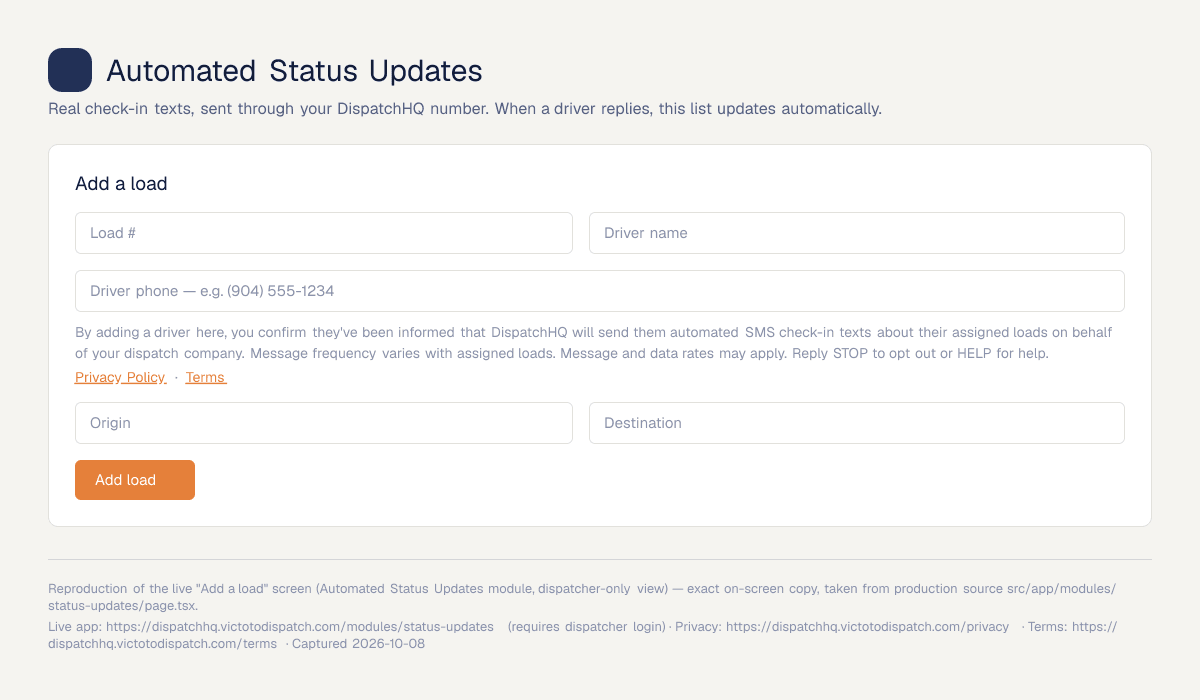
DispatchHQ (formerly DispatchiQ) is operated by Confetti Events LLC, doing business as DispatchHQ. This page describes the text-message feature of our dispatch software and how drivers agree to receive it. The feature is pre-launch: it sits inside a dispatcher login, so the opt-in screen is not visible on our public pages. A screenshot of it is shown below.
1. What the texts are
Automated load-status check-in texts sent through DispatchHQ by a trucking dispatch company to its own assigned drivers, asking for a quick status update on a specific load. Driver replies update the load status in the dispatcher's dashboard. These are not marketing or promotional messages.
2. Who receives them and how they agree
Recipients are drivers who already work for the dispatch company that assigns them a load. There are two steps:
Step 1 — Verbal notice at load assignment (in person or by phone). The dispatcher says: "Hey [driver], you're on load #[number] today. You'll get automated text check-ins from DispatchHQ asking for a quick status update. Just reply to those texts. If you ever want them to stop, reply STOP to any message." The driver agrees (for example: "Got it, sounds good").
Step 2 — In-app confirmation. The dispatcher enters the driver's name and mobile number in the DispatchHQ web app. Beside the phone number field, the form shows the notice below, which the dispatcher confirms. No text is sent until the dispatcher clicks "Send check-in" for a specific load.
3. Sample message
"DispatchHQ check-in: How's load #1234 going? Reply with a quick status update."
4. Frequency, rates, opting out and help
Message frequency varies with the loads a driver is assigned. Message and data rates may apply. Reply STOP at any time to stop receiving messages, or HELP for help. Support: info@victotodispatch.com.
We do not share, sell, or provide mobile phone numbers or messaging consent data to third parties or affiliates for marketing or promotional purposes. See our Privacy Policy and Terms of Service.